Trying to take a picture of yourself can be hard.
Love the challenge.
I've added the new cape to the collection of capes page. Still need to do my blue basketball material one.
Monday, September 23, 2013


Thursday, August 22, 2013
Minecraft got me onto github
I've been playing Minecraft for a long time now and I've always enjoyed knowing the fact it is written in Java. Things became interesting when I started playing with a friend on a private server. We hang out on Skype and basically make our own fun.
The guy running the server felt a little out of his league and was struggling to keep up with updates. Always that frustrating balance of work and life.
So I offered a hand. I've ran a few servers and I love looking after Java stuff.
The first trick I needed to do was be able to set up a testing environment that wouldn't affect the people playing the game. Easy enough to use my little netbook. It took a little while to work out how to separate the server configuration from the server data but I managed to do it with a bukkit server. I think the main bit was moving the world data outside the home directory via world-container and launching the app with "-log-pattern ../minecraftData/server.log"
We were using the https://github.com/gamerx/Backup plugin to take snapshots of the world but this plugin didn't recognise the world-container configuration. Was super simple to fork it at https://github.com/pimaster/Backup, build and deploy.
I believe the changes have been pulled into gamerx's copy but a new version hasn't been released for such a minor change.
dynamap took a lot more fiddling around trying to understand what it setup and expected.
tilespath: ../../../minecraftData/dynmap/web/tiles
webpath: ../../../minecraftData/dynmap/web
I then copied some of the html that needed to be served into this directory so it knew how to server up the basic data. Fortunately it still looked in the plugins directory for some of the more dynamic resources.
With this set, I was able to symlink the data directory to a directory in Dropbox. It meant the same configuration I was testing inside Eclipse was also used on my netbook. When I was happy with my testing, I used a diff application to move new settings and plugins to another folder in Dropbox that was synced the hosted server.
I was in admin heaven :D
Then came a request to have multiple worlds hosted by the same process. The requirement was we wanted people to be creative in some areas without the hassle of mobs but still be able to have the challenge of fighting of mobs without access to the creative tools.
There were a couple of plugins that changed a players gamemode per world but none had the ability to remember a players state in a mixed world.
So I wrote https://github.com/pimaster/GameModeRememberer.
Forces players into a game mode on some worlds.
Remembers if a player has a certain game mode on others.
Also has some basic inventory management when switching worlds.
Need to work on enforcing certain rules in worlds. At the moment I believe a player in a survival world can be given resources from a player with operator status in creative worlds. Would be nice to stop this.
The guy running the server felt a little out of his league and was struggling to keep up with updates. Always that frustrating balance of work and life.
So I offered a hand. I've ran a few servers and I love looking after Java stuff.
The first trick I needed to do was be able to set up a testing environment that wouldn't affect the people playing the game. Easy enough to use my little netbook. It took a little while to work out how to separate the server configuration from the server data but I managed to do it with a bukkit server. I think the main bit was moving the world data outside the home directory via world-container and launching the app with "-log-pattern ../minecraftData/server.log"
We were using the https://github.com/gamerx/Backup plugin to take snapshots of the world but this plugin didn't recognise the world-container configuration. Was super simple to fork it at https://github.com/pimaster/Backup, build and deploy.
I believe the changes have been pulled into gamerx's copy but a new version hasn't been released for such a minor change.
dynamap took a lot more fiddling around trying to understand what it setup and expected.
tilespath: ../../../minecraftData/dynmap/web/tiles
webpath: ../../../minecraftData/dynmap/web
I then copied some of the html that needed to be served into this directory so it knew how to server up the basic data. Fortunately it still looked in the plugins directory for some of the more dynamic resources.
With this set, I was able to symlink the data directory to a directory in Dropbox. It meant the same configuration I was testing inside Eclipse was also used on my netbook. When I was happy with my testing, I used a diff application to move new settings and plugins to another folder in Dropbox that was synced the hosted server.
I was in admin heaven :D
Then came a request to have multiple worlds hosted by the same process. The requirement was we wanted people to be creative in some areas without the hassle of mobs but still be able to have the challenge of fighting of mobs without access to the creative tools.
There were a couple of plugins that changed a players gamemode per world but none had the ability to remember a players state in a mixed world.
So I wrote https://github.com/pimaster/GameModeRememberer.
Forces players into a game mode on some worlds.
Remembers if a player has a certain game mode on others.
Also has some basic inventory management when switching worlds.
Need to work on enforcing certain rules in worlds. At the moment I believe a player in a survival world can be given resources from a player with operator status in creative worlds. Would be nice to stop this.
Thursday, March 14, 2013
Building Browser Plugins
You know those moments when you are asked to build something that just cannot be done from a web app?
Was asked how we could take a screen shot of a web page being viewed for annotation and review.
The good thing being, this is what browser add ons are for.
So I started with Chrome, being the browser most used after Internet Explorer.
Took a little bit but finally got everything sorted.
Was then able to take most of that knowledge and apply it to Firefox.
Safari was meant to look stupidly simple, but it took me a while to work out that plugins weren't being activated on files served from the file system. Had to set up a http server :/
You'll notice that I skipped IE even though it is the browser that sees the most use amongst the customers.
That's because it doesn't have an add on system like the other browsers do.
You have to build an add on that technically exists in the operating system and then targets the browser. I can't write javascript like I was for other browsers.
What did I take away from building the plugins?
Chrome was the favourite. Building the plugins was rather easy. There is a clear path for reloading the plugin and bundling it for delivery. Documentation was good.
Safari was the next easiest. Building the plugin was straight forward although I hated having the extra 'plugin builder' window open that is where I reloaded the plugin for. Filling out the details for the plugin via a UI is a very mac way of doing things. Documentation was a pain to navigate and sometimes missing some detail. Building the plugin for delivery was easy enough.
Which leaves Firefox near the bottom of the list. You have to disable some caching options so that it always picks up the latest version of the plugin you are building. You also have to open a new window every time you want to reload your plugin which for me meant restarting Firefox for every change. Documentation was excellent though. Building the plugin for deployment was a little trickier than the others.
At least I built add ons for those browsers. I just couldn't make it happen for IE.
Getting a grip on verbage.
I keep wanting to use the word plug-in.
Plugins are generally used for features like embedding the Flash player.
Extension was sometimes used for other things as well, like supporting different image/video formats.
Minor thing but annoying.
Was asked how we could take a screen shot of a web page being viewed for annotation and review.
The good thing being, this is what browser add ons are for.
So I started with Chrome, being the browser most used after Internet Explorer.
Took a little bit but finally got everything sorted.
Was then able to take most of that knowledge and apply it to Firefox.
Safari was meant to look stupidly simple, but it took me a while to work out that plugins weren't being activated on files served from the file system. Had to set up a http server :/
You'll notice that I skipped IE even though it is the browser that sees the most use amongst the customers.
That's because it doesn't have an add on system like the other browsers do.
You have to build an add on that technically exists in the operating system and then targets the browser. I can't write javascript like I was for other browsers.
What did I take away from building the plugins?
Chrome was the favourite. Building the plugins was rather easy. There is a clear path for reloading the plugin and bundling it for delivery. Documentation was good.
Safari was the next easiest. Building the plugin was straight forward although I hated having the extra 'plugin builder' window open that is where I reloaded the plugin for. Filling out the details for the plugin via a UI is a very mac way of doing things. Documentation was a pain to navigate and sometimes missing some detail. Building the plugin for delivery was easy enough.
Which leaves Firefox near the bottom of the list. You have to disable some caching options so that it always picks up the latest version of the plugin you are building. You also have to open a new window every time you want to reload your plugin which for me meant restarting Firefox for every change. Documentation was excellent though. Building the plugin for deployment was a little trickier than the others.
At least I built add ons for those browsers. I just couldn't make it happen for IE.
Getting a grip on verbage.
I keep wanting to use the word plug-in.
Plugins are generally used for features like embedding the Flash player.
Extension was sometimes used for other things as well, like supporting different image/video formats.
Minor thing but annoying.
Tuesday, February 19, 2013
Drawing lines in the sand
I don't think anyone reads this blog any more so I may as well put this here.
I don't mind losing something I may never have had.
My problem is with trusting someone whom maybe I shouldn't have trusted. Really thought I was past that.
It would have been nice to find out if everything changed and maybe I just wasn't to trust her in the dying moments.
I was terrified with the way you wanted to continue playing the game your way.
12 years is a long time to not know someone.
There were some fun moments but I was looking forward to discussing the bigger things in life with you.
I like knowing why.
I put all my eggs in one basket.
I never want to be in a rush.
I rarely have a backup plan.
I don't mind losing something I may never have had.
My problem is with trusting someone whom maybe I shouldn't have trusted. Really thought I was past that.
It would have been nice to find out if everything changed and maybe I just wasn't to trust her in the dying moments.
I was terrified with the way you wanted to continue playing the game your way.
12 years is a long time to not know someone.
There were some fun moments but I was looking forward to discussing the bigger things in life with you.
I like knowing why.
I put all my eggs in one basket.
I never want to be in a rush.
I rarely have a backup plan.
Friday, February 1, 2013
Testing certficates on a server
Just been facing one of those problem where if you were dealing with it every day, you'd solve it in no time.
On some of my browsers across my many machines, I was able to access my works https site without any warning of being an untrusted source.
Firefox however, did not want to behave.
Apparently a browser can optionally look up the intermediate certificate from the one the server provides. Obviously this sort of automatic trust can be a bit of a security issue.
Finally found a site that did an independent test (wanted something automated and outside the network).
https://www.wormly.com
Pointed out the problem and even gave a hint on how to fix it.
Explained it to the network admin and he was able to track it down.
On some of my browsers across my many machines, I was able to access my works https site without any warning of being an untrusted source.
Firefox however, did not want to behave.
Apparently a browser can optionally look up the intermediate certificate from the one the server provides. Obviously this sort of automatic trust can be a bit of a security issue.
Finally found a site that did an independent test (wanted something automated and outside the network).
https://www.wormly.com
Pointed out the problem and even gave a hint on how to fix it.
Explained it to the network admin and he was able to track it down.
Wednesday, November 14, 2012
Picture is worth 1000 words
It's funny when you compare API's.
Java's drawImage method:
drawImage(img, sx, sy, sw, sh, dx, dy, dw, dh)
With Java your focus is on the destination first and then where you are reading the information from.
With Javascript, you grab some part of an image and put it onto the canvas.
I found that working with the width and height easier as well instead of doing things like "x + width" all the time.
When I was trying to get it right though, seems I was trying to be too creative.
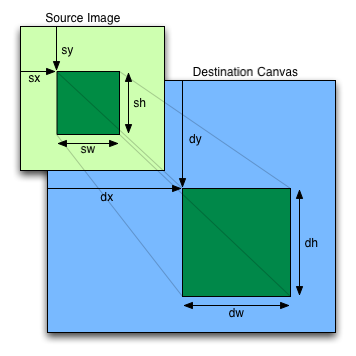
Found a site with a nice image explaining the situation though:
 Props to the guys for making it look easy.
Java's drawImage method:
drawImage(Image img,
          int dx1, int dy1, int dx2, int dy2,
          int sx1, int sy1, int sx2, int sy2, ImageObserver observer)
Javascript drawImage:
drawImage(img, sx, sy, sw, sh, dx, dy, dw, dh)
With Java your focus is on the destination first and then where you are reading the information from.
With Javascript, you grab some part of an image and put it onto the canvas.
I found that working with the width and height easier as well instead of doing things like "x + width" all the time.
When I was trying to get it right though, seems I was trying to be too creative.
Found a site with a nice image explaining the situation though:
Tuesday, November 13, 2012
Chrome captureVisibleTab and the Canvas
Writing a browser plugin at work to capture what is being displayed in the current tab.
Was originally looking at cool Javascript -> Canvas -> Image processors like http://html2canvas.hertzen.com/ but it just wasn't going to cut the cake.
Chrome has a lovely call chrome.tabs.captureVisibleTab that just gave me what I wanted.
Mocked up something simple to do a round trip to our server and I was good to go.
Started working on the problem and it was obvious that I needed to crop the image before sending it to the server. Not a problem. I knew Canvas had a drawImage method that allowed cropping and scaling and I was happy to read from the Chrome documentation that the image data "may be assigned to the 'src' property of an HTML Image element for display."
After writing the code to create the new image, do some cropping, passing messages between different layers in the extension I was ready for testing.
After some initial PEBKAC issues like not supplying enough parameters to drawImage, I was just ending up with a white image.
Hmmmm.
So I drew a box on my canvas to make sure I was passing the right image back to the server.
Finally got that working so I started stressing. What is with the drawImage method?
Was making smaller and smaller changes and constantly reloading the plugin and the page I was testing from and then one time, I told it to capture a second time.
Only when it fired the second time did it work.
So straight to google to find concerning messages like drawImage doesn't draw the first time.
It seems that even when the image is generated from a canvas, I was still required to wait for the image element to load.
So for the whole purpose of posting some demo code:
chrome.windows.getCurrent(function(win)
{
chrome.tabs.captureVisibleTab(
null, null, function(data)
{
var canvas = document.createElementNS('http://www.w3.org/1999/xhtml', 'html:canvas')
var image = new Image(800,600);
var context = canvas.getContext('2d');
canvas.width = 800;
canvas.height = 600;
image.onload = function() {
context.drawImage(image, 0, 0); // Obviously cropping goes here
var sender = new XMLHttpRequest();
sender.open("POST", <<some url>>, false);
var cropped = canvas.toDataURL('image/jpg', 90)
sender.send(cropped.substring(cropped.indexOf(',')));
}
image.src = data;
});
});
Hooray for code on a code blog \o/
Was originally looking at cool Javascript -> Canvas -> Image processors like http://html2canvas.hertzen.com/ but it just wasn't going to cut the cake.
Chrome has a lovely call chrome.tabs.captureVisibleTab that just gave me what I wanted.
Mocked up something simple to do a round trip to our server and I was good to go.
Started working on the problem and it was obvious that I needed to crop the image before sending it to the server. Not a problem. I knew Canvas had a drawImage method that allowed cropping and scaling and I was happy to read from the Chrome documentation that the image data "may be assigned to the 'src' property of an HTML Image element for display."
After writing the code to create the new image, do some cropping, passing messages between different layers in the extension I was ready for testing.
After some initial PEBKAC issues like not supplying enough parameters to drawImage, I was just ending up with a white image.
Hmmmm.
So I drew a box on my canvas to make sure I was passing the right image back to the server.
Finally got that working so I started stressing. What is with the drawImage method?
Was making smaller and smaller changes and constantly reloading the plugin and the page I was testing from and then one time, I told it to capture a second time.
Only when it fired the second time did it work.
So straight to google to find concerning messages like drawImage doesn't draw the first time.
It seems that even when the image is generated from a canvas, I was still required to wait for the image element to load.
So for the whole purpose of posting some demo code:
chrome.windows.getCurrent(function(win)
{
chrome.tabs.captureVisibleTab(
null, null, function(data)
{
var canvas = document.createElementNS('http://www.w3.org/1999/xhtml', 'html:canvas')
var image = new Image(800,600);
var context = canvas.getContext('2d');
canvas.width = 800;
canvas.height = 600;
image.onload = function() {
context.drawImage(image, 0, 0); // Obviously cropping goes here
var sender = new XMLHttpRequest();
sender.open("POST", <<some url>>, false);
var cropped = canvas.toDataURL('image/jpg', 90)
sender.send(cropped.substring(cropped.indexOf(',')));
}
image.src = data;
});
});
Hooray for code on a code blog \o/
Subscribe to:
Posts (Atom)