Just been facing one of those problem where if you were dealing with it every day, you'd solve it in no time.
On some of my browsers across my many machines, I was able to access my works https site without any warning of being an untrusted source.
Firefox however, did not want to behave.
Apparently a browser can optionally look up the intermediate certificate from the one the server provides. Obviously this sort of automatic trust can be a bit of a security issue.
Finally found a site that did an independent test (wanted something automated and outside the network).
https://www.wormly.com
Pointed out the problem and even gave a hint on how to fix it.
Explained it to the network admin and he was able to track it down.
Friday, February 1, 2013

Wednesday, November 14, 2012
Picture is worth 1000 words
It's funny when you compare API's.
Java's drawImage method:
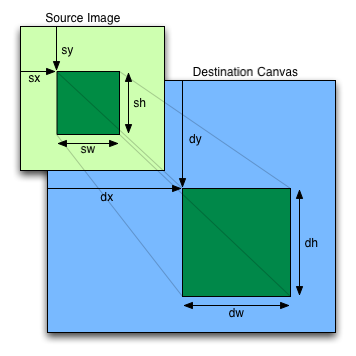
drawImage(img, sx, sy, sw, sh, dx, dy, dw, dh)
With Java your focus is on the destination first and then where you are reading the information from.
With Javascript, you grab some part of an image and put it onto the canvas.
I found that working with the width and height easier as well instead of doing things like "x + width" all the time.
When I was trying to get it right though, seems I was trying to be too creative.
Found a site with a nice image explaining the situation though:
 Props to the guys for making it look easy.
Java's drawImage method:
drawImage(Image img,
          int dx1, int dy1, int dx2, int dy2,
          int sx1, int sy1, int sx2, int sy2, ImageObserver observer)
Javascript drawImage:
drawImage(img, sx, sy, sw, sh, dx, dy, dw, dh)
With Java your focus is on the destination first and then where you are reading the information from.
With Javascript, you grab some part of an image and put it onto the canvas.
I found that working with the width and height easier as well instead of doing things like "x + width" all the time.
When I was trying to get it right though, seems I was trying to be too creative.
Found a site with a nice image explaining the situation though:
Tuesday, November 13, 2012
Chrome captureVisibleTab and the Canvas
Writing a browser plugin at work to capture what is being displayed in the current tab.
Was originally looking at cool Javascript -> Canvas -> Image processors like http://html2canvas.hertzen.com/ but it just wasn't going to cut the cake.
Chrome has a lovely call chrome.tabs.captureVisibleTab that just gave me what I wanted.
Mocked up something simple to do a round trip to our server and I was good to go.
Started working on the problem and it was obvious that I needed to crop the image before sending it to the server. Not a problem. I knew Canvas had a drawImage method that allowed cropping and scaling and I was happy to read from the Chrome documentation that the image data "may be assigned to the 'src' property of an HTML Image element for display."
After writing the code to create the new image, do some cropping, passing messages between different layers in the extension I was ready for testing.
After some initial PEBKAC issues like not supplying enough parameters to drawImage, I was just ending up with a white image.
Hmmmm.
So I drew a box on my canvas to make sure I was passing the right image back to the server.
Finally got that working so I started stressing. What is with the drawImage method?
Was making smaller and smaller changes and constantly reloading the plugin and the page I was testing from and then one time, I told it to capture a second time.
Only when it fired the second time did it work.
So straight to google to find concerning messages like drawImage doesn't draw the first time.
It seems that even when the image is generated from a canvas, I was still required to wait for the image element to load.
So for the whole purpose of posting some demo code:
chrome.windows.getCurrent(function(win)
{
chrome.tabs.captureVisibleTab(
null, null, function(data)
{
var canvas = document.createElementNS('http://www.w3.org/1999/xhtml', 'html:canvas')
var image = new Image(800,600);
var context = canvas.getContext('2d');
canvas.width = 800;
canvas.height = 600;
image.onload = function() {
context.drawImage(image, 0, 0); // Obviously cropping goes here
var sender = new XMLHttpRequest();
sender.open("POST", <<some url>>, false);
var cropped = canvas.toDataURL('image/jpg', 90)
sender.send(cropped.substring(cropped.indexOf(',')));
}
image.src = data;
});
});
Hooray for code on a code blog \o/
Was originally looking at cool Javascript -> Canvas -> Image processors like http://html2canvas.hertzen.com/ but it just wasn't going to cut the cake.
Chrome has a lovely call chrome.tabs.captureVisibleTab that just gave me what I wanted.
Mocked up something simple to do a round trip to our server and I was good to go.
Started working on the problem and it was obvious that I needed to crop the image before sending it to the server. Not a problem. I knew Canvas had a drawImage method that allowed cropping and scaling and I was happy to read from the Chrome documentation that the image data "may be assigned to the 'src' property of an HTML Image element for display."
After writing the code to create the new image, do some cropping, passing messages between different layers in the extension I was ready for testing.
After some initial PEBKAC issues like not supplying enough parameters to drawImage, I was just ending up with a white image.
Hmmmm.
So I drew a box on my canvas to make sure I was passing the right image back to the server.
Finally got that working so I started stressing. What is with the drawImage method?
Was making smaller and smaller changes and constantly reloading the plugin and the page I was testing from and then one time, I told it to capture a second time.
Only when it fired the second time did it work.
So straight to google to find concerning messages like drawImage doesn't draw the first time.
It seems that even when the image is generated from a canvas, I was still required to wait for the image element to load.
So for the whole purpose of posting some demo code:
chrome.windows.getCurrent(function(win)
{
chrome.tabs.captureVisibleTab(
null, null, function(data)
{
var canvas = document.createElementNS('http://www.w3.org/1999/xhtml', 'html:canvas')
var image = new Image(800,600);
var context = canvas.getContext('2d');
canvas.width = 800;
canvas.height = 600;
image.onload = function() {
context.drawImage(image, 0, 0); // Obviously cropping goes here
var sender = new XMLHttpRequest();
sender.open("POST", <<some url>>, false);
var cropped = canvas.toDataURL('image/jpg', 90)
sender.send(cropped.substring(cropped.indexOf(',')));
}
image.src = data;
});
});
Hooray for code on a code blog \o/
Sunday, September 16, 2012
Really loving my camera
I know it isn't always about the camera
(Wow, how did blogger lose this image?)
I know the subjects aren't particularly unique.
 But I love sharing some of my shots.

(Wow, how did blogger lose this image?)


Thursday, May 24, 2012
Today I wrote a Braille Converter
As just a bit of a laugh, I wrote my Facebook status in morse code.
After someone thought it was braille, I thought that doing a status in braille was a good idea.
Except there were no converters that I could copy and paste the characters from, so I had to do it on the fly.
Since I am a coder though, I really should code my own solution.
Braille Converter!!
Feel like this is the sort of thing I could almost start a github account for.
I was going to throw it straight onto this blog but I can't control the encoding of the page, so the UTF-8 characters got lost.
Hooray for coding!!
-- edit --
Seems I've got an encoding issue in Chrome anyway //.o
After someone thought it was braille, I thought that doing a status in braille was a good idea.
Except there were no converters that I could copy and paste the characters from, so I had to do it on the fly.
Since I am a coder though, I really should code my own solution.
Braille Converter!!
Feel like this is the sort of thing I could almost start a github account for.
I was going to throw it straight onto this blog but I can't control the encoding of the page, so the UTF-8 characters got lost.
Hooray for coding!!
-- edit --
Seems I've got an encoding issue in Chrome anyway //.o
Friday, September 9, 2011


Saturday, August 27, 2011


Subscribe to:
Posts (Atom)